
26-block builder, no standalone subscription — from $149/year.
WordPress Email Template Builder With 26 Drag-and-Drop Blocks, Built Into Your CRM
A professional WordPress email template builder with desktop and mobile preview, autosave, 50-step undo, custom field merge tags, and a 26-block library across 6 categories. The kind of builder most teams pay $20 to $200 a month for — built into Auto Form CRM, included at every pricing tier, on your own server.
- 26 blocks
- Desktop & mobile preview
- Autosave
- Email-client compatible
- WordPress-native
- No standalone subscription
Content Blocks
Desktop Preview · 600px
Summer Sale is Live
Up to 40% off everything for the next 48 hours
Ends In
Page Background
Email Content Background
Email Width: 600px
Font Family
HTML Title
Professional Email Design Usually Means Two Subscriptions
Building professional emails in WordPress usually means one of three painful paths.
Path one: use the basic editor in your WordPress email plugin. MailPoet, FluentCRM, Groundhogg — they all ship a block editor of some sort, most with between five and twelve blocks. Enough for a basic newsletter. Not enough for a hero banner with a CTA, a pricing table, a testimonial with star ratings, a countdown timer, or a multi-column layout. By the time you need professional design, you've outgrown the built-in tool.
Path two: subscribe to a standalone email design tool. Stripo, Beefree, Postcards, Topol. Excellent at what they do — but they cost $15 to $200 a month, they only build templates, and you still need a separate email service to send. Your $99/mo Klaviyo subscription stacks on top of your $50/mo Stripo subscription, and you're paying $150 a month to design and send emails to your own customers.
Path three: hire a developer to hand-code your templates. Pay $500 to $5,000 per template. Wait two weeks. Discover it breaks in Outlook. Pay another $500 to fix it. The next campaign needs a redesign and the cycle starts over.
Auto Form CRM solves all three at once — a professional 26-block builder built into the plugin, templates usable everywhere, for a flat $149 a year.
Regardless of how many templates you build, emails you send, or contacts you have.
Four Things You Won't Find in Any Other WordPress Email Builder
26 blocks across 6 categories
Basic, Layout, Content, Social, E-commerce, and Advanced. Heading, text, image, button, divider, columns, hero, CTA, testimonial, FAQ, product showcase, pricing table, countdown timer, progress bar, social icons, video, HTML, gallery, and more. Most WordPress email plugins ship between 5 and 12 blocks. Auto Form CRM ships 26.
Desktop AND mobile preview
Toggle between Desktop Preview at your configured width (400–800px, with 600px the email-safe default) and Mobile Preview at the standard 375px viewport. See exactly how your email renders before you save. Most WordPress builders only show desktop — Auto Form CRM confirms mobile on every template, every time.
Custom fields auto-appear as merge tags
The seven core merge tags cover most needs — but every custom contact field you’ve defined automatically becomes a merge tag too. Track a "License Tier" field? Insert {{license_tier}} into your subject lines and content with one click. No separate variable configuration. No developer required.
Built into your CRM at flat pricing
Personal at $149 a year includes the full 26-block builder, autosave, undo history, merge tag library, mobile preview, and test-send. No standalone design subscription. No separate email service. No per-template fees. One plugin, one flat price, every feature.
Every Block Your Email Actually Needs
Search by name or description. Filter by category tab. Drag any block from the panel onto the canvas. The library shows the live count at the top: "26 blocks available."
Basic
6 blocks · the foundationHeading
Standalone titles, H1–H6
Text
Rich text with merge tags
Image
Single image with link & alt
Button
Call-to-action button
Divider
Solid, dashed, or dotted
Spacer
Vertical whitespace control
Layout
4 blocks · the structureColumns
1–4 columns, 11 nestable types
Header
Logo + optional nav links
Footer
Company info, social, unsubscribe
Preheader
Inbox preview text
Content
6 blocks · the marketingHero
Banner with title, subtitle, CTA
Call to Action
Conversion-focused section
Testimonial
Quote + author + star rating
Quote
Stylized blockquote
FAQ
Q&A pairs with add/remove
Icon + Text
Feature highlight
Social
3 blocks · the connectionSocial Icons
6 platforms, 3 icon styles
Video
Thumbnail + play button
Menu
Horizontal nav with separator
E-commerce
4 blocks · the revenueProduct
Image, price, badge, buy button
Pricing Table
Tiers with highlighted plan
Countdown
Urgency timer to a target date
Progress Bar
Visual progress indicator
Advanced
3 blocks · the power toolsHTML
Raw custom HTML block
Logo
Standalone company logo
Gallery
Image grid, configurable columns
Three Panels. Drag. Drop. Done.
The Email Template Builder opens in full-screen mode with three working panels — Content Blocks on the left, a live canvas in the center, Email Settings on the right. Drag-and-drop, click-to-select, instant preview, undo and redo, keyboard shortcuts.
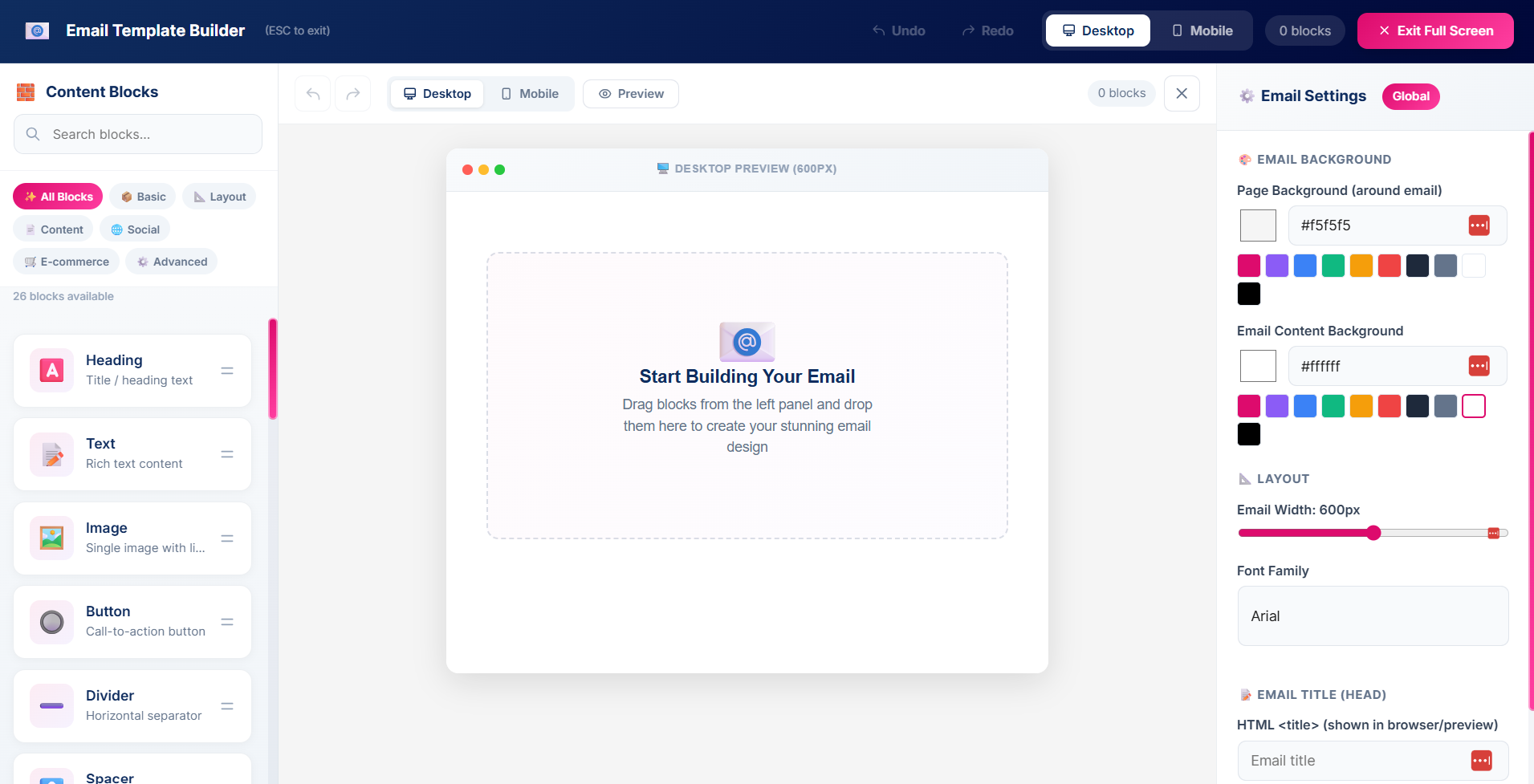
Left panel — the block library
Searchable. Categorized. Drag any block to the canvas. The block counter at the top updates as you add blocks. Category tabs filter the visible options.
Center canvas — the live email
A device-framed preview labeled "Desktop Preview." Your email renders at the configured width (600px by default). Click any block to select it, drag its handle to reorder, or use the move/duplicate/delete controls.
Right panel — the settings
When no block is selected, the panel shows global Email Settings. Select a block and it switches to that block’s content and style options. A "← Email Settings" link returns to the global panel any time.
Global Email Settings
- Page Background — the color around the email
- Email Content Background — the color inside the body
- Email Width — a 400–800px slider, 600px default
- Font Family — 9 options incl. Arial, Georgia, Verdana
- HTML Title — the title shown in browser tabs
Per-block settings & full-screen mode
Every block has its own panel split into Content (what it says) and Style (how it looks). The Countdown block, for example, exposes a target date and time, a title field, a Show Labels toggle, and a background color picker with hex input and preset palette.
A dedicated Exit Full Screen toggle sits in the top-right; press ESC any time. The builder hides the WordPress admin chrome entirely so you focus on the design without distraction.
Build Newsletter-Quality Designs With Nested Columns
The Columns block is what separates a basic email builder from a professional one. Most WordPress email plugins ship single-column layouts only. Auto Form CRM ships 1 to 4 column layouts with 11 nestable block types per column.
Columns block · 3 columns
Drop zones active11 nestable block types
Heading, Text, Image, Button, Divider, Spacer, Icon + Text, Social Icons, Video, Logo, and HTML all work inside columns. Build a two-column image-plus-CTA, a three-column feature grid, or a four-column product showcase.
Per-column styling
Each column has its own background color, text color, and padding. Color one column to highlight a featured product. Add a tinted sidebar column to set it apart from the main content.
Reorder and move between columns
Drag handles work on nested blocks too. Reorder within a column by dragging, or move a block across the column boundary into another column.
Drop zones make nesting obvious
Drag a nestable block over a Columns block and drop zones light up inside each column showing exactly where it will land. No guesswork. No misplaced blocks.
Select a nested block and the settings panel shows a "← Back to Columns" link at the top, so you can quickly return to the parent column's styling. The breadcrumb-style navigation keeps complex layouts manageable.
See Your Email Render on Desktop and Mobile, Live
Most subscribers open on mobile. Some still open on desktop. The professional standard is to design for both — and Auto Form CRM ships both preview modes built into the builder.
Desktop renders side-by-side columns
Mobile stacks them vertically
Desktop Preview
The canvas renders the email at your configured width — 600px by default, up to 800px for image-heavy newsletters or down to 400px for narrow notifications. The 600px default is the email-industry-standard safe width.
Mobile Preview
A toggle swaps the canvas to a 375px viewport — the standard mobile rendering width. Columns stack vertically, images scale to fit, text stays legible. You see exactly what subscribers see on their phone.
Preview Mode
A dedicated Preview button switches the canvas to clean preview mode — hiding all edit controls and showing only the final rendered design. The last check before save, with no builder UI overlays.
A Real Editor for Your Email Copy
Text is what your subscribers actually read. The Text block is a full rich text editor, not a stripped-down note field — with everything a professional email copywriter needs, inline where they compose.
Hi {{first_name}},
Thanks for being a {{license_tier}} customer. Here's what's new this month at {{company_name}}:
- Faster autosave and a cleaner builder UI
- Four new e-commerce blocks
The formatting toolbar
Paragraph and heading levels (H1–H4) plus blockquote. Font sizes from 10 to 48px. Text color with hex input and preset swatches. Bold, italic, underline, strikethrough. Left/center/right alignment. Bullet and numbered lists. Insert and remove link. Clear formatting. Tab inserts indent spacing.
Inline merge tag buttons
A dedicated row of merge tag buttons inserts personalization with one click — First Name, Last Name, Email, Phone, Company Name, and every custom field you've defined. The tag inserts at the cursor wherever you have focus.
Why this matters
Most WordPress email builders treat text as an afterthought. Auto Form CRM treats it as the most important block in the email — hierarchy, color, lists, links, and personalization all live inline where your writers actually compose, not buried in nested settings.
Every Contact Field Becomes a Merge Tag, Automatically
Personalization is what separates a mass email from a relationship-building email. You get the tools used by enterprise email platforms — without the enterprise pricing.
The core 7 merge tags
{{first_name}}Contact first name{{last_name}}Contact last name{{email}}Email address{{phone}}Phone number{{company_name}}Company name{{unsubscribe_link}}Auto opt-out link{{view_in_browser}}Web view linkPlus every custom field
Every active custom contact field you've defined in Custom Fields automatically becomes a merge tag the moment you save it — the kind of integration most marketing tools require a developer to wire up.
{{license_tier}}{{contract_end_date}}{{referral_source}}{{account_manager}}Subject Line
Insert Tag{{first_name}}{{last_name}}{{email}}{{phone}}{{company_name}}{{unsubscribe_link}}{{view_in_browser}}{{license_tier}}Custom field{{contract_end_date}}Custom field{{referral_source}}Custom field{{account_manager}}Custom field{{unsubscribe_link}} and {{view_in_browser}} are auto-handled — each generates a unique URL per recipient. Drop them in your footer once and they work across every template, every campaign, every send.
Autosave Every 30 Seconds. Undo 50 Steps Back.
The worst feeling in email design is closing a tab and losing two hours of work. Auto Form CRM ships with the safety features professional design tools have spent years refining.
Autosave every 30 seconds
For any existing template, the builder autosaves every 30 seconds in the background. Type a heading, add a block, change a color — within 30 seconds your work is persisted. Close the tab, switch browsers, come back tomorrow. Your template is exactly where you left it.
Undo and Redo, 50-step history
Every action — adding, moving, deleting, color changes, text edits, image resizing — is tracked. Step back up to 50 actions with Undo or Ctrl+Z. Step forward with Redo or Ctrl+Y. Most builders give you 10 to 20 steps. Auto Form CRM gives you 50.
Unsaved changes warning
Try to navigate away with unsaved changes and the browser shows a confirmation prompt. Try to navigate inside the WordPress admin and an in-app modal asks the same. The protections kick in automatically — you don’t have to remember to save.
Send Test auto-saves
Click Send Test on a new template you haven’t saved and the system auto-saves it first, then sends. You can’t accidentally test-send an unsaved template and lose the work.
Save validation
The save process validates that your template has at least one block before letting you proceed to Details and Save. An empty template can’t accidentally get saved as a working template.
Built for Gmail, Outlook, Apple Mail, Yahoo, and Every Client That Matters
A beautifully designed email that breaks in Outlook is a wasted send. Auto Form CRM solves email-client compatibility at the engine level so your campaigns render correctly everywhere.
Table-based HTML output
The builder composes visually using modern CSS and HTML, then generates an email-client-safe version using table-based HTML at save time — the same technique Mailchimp, Klaviyo, and Stripo use, because it’s the only one that renders consistently across major clients. You never write or debug it.
Bundled PNG social icons
SVG and icon fonts render as boxes in Outlook. Auto Form CRM bundles its social icons as actual PNG files in three styles — Brand Colors, Dark Circle, and Monochrome — compatible with Gmail, Outlook, Yahoo, Apple Mail, and every major client.
Plain-text fallback
Clients that block HTML fall back to plain text. The output is structured so text stays readable and merge tags resolve correctly even in fallback. Your unsubscribe link still works. Your subscriber experience stays intact.
Countdown that works in email
The Countdown block is a snapshot of the time remaining, calculated when the email is generated and sent. Clients block JavaScript, so a live ticker isn’t possible inside an inbox — the snapshot approach is the industry-standard solution every email service uses.
Footer with unsubscribe baked in
The Footer block has built-in support for the {{unsubscribe_link}} merge tag. Drop the footer at the bottom of every template and compliance is handled — every email has a working, regulation-compliant unsubscribe link.
Built the way the pros build
Most WordPress plugins ship "modern" HTML that breaks in Outlook 2016 still used at corporate clients. Most standalone builders solve this; most WordPress builders don’t. Auto Form CRM is built the way professional tools are built.
Search, Filter, Duplicate, Edit, Delete
Templates accumulate over time — a welcome series, a monthly newsletter, a promo, a receipt, a win-back. The Templates library page is designed for managing them at scale.
Email Templates
New TemplateMonthly Newsletter
Welcome Series — Email 1
Black Friday Promo
Win-Back: Lapsed Customers
Order Receipt
Product Launch Hero
The library page
A grid of every template, each card showing the name, an envelope-icon thumbnail, the category label, and Edit / Duplicate / Delete buttons.
Search and filter
Search by name as you type. Category pills narrow by Custom, Welcome, Newsletter, Promotion, or Follow-up. Combine both to find any template in a library of hundreds.
Duplicate for iteration
The Duplicate button clones any template with "(Copy)" appended. Clone last month’s newsletter, edit only what changes, ship. Iteration becomes effortless.
Template categories
Five categories organize your library. Pick one when you create the template — change it later from the Template Information page if your use case evolves.
One Template, Three Use Cases
Templates aren't just for email campaigns. The same template you build in the visual editor powers three distinct email surfaces in Auto Form CRM.
Email Campaigns
Build a template, select it in the Email Campaigns wizard, override the subject line for that send if needed, send. The whole campaign system is built around your template library.
Email Campaigns→Workflow Automation
Every Send Email and Send Campaign Email action selects from your template library. Build a "Welcome new customer" template once and use it across your cart recovery, onboarding, repeat-purchase, and VIP-upgrade workflows.
Workflow Automation→Transactional Emails
Order confirmations, password resets, account notifications, contact form responses can all use templates from your library. Brand your transactional emails to match your campaigns. Every email carries the same design language.
See campaigns→The Default Subject Line
Every template has a Default Subject Line. It ships with the email in workflows and transactional sends. In campaigns, the wizard can override it for that specific send. The template stays clean and reusable; the campaign stays flexible.
I Built This Because Every WordPress Email Plugin Has a Mediocre Builder
I've evaluated every major WordPress email plugin over the years. They all have the same problem.
The builder is always an afterthought. Five blocks. Maybe ten. A heading, a text block, an image, a button, a divider. Enough to send a basic newsletter that looks like every other basic newsletter. The moment I needed anything design-forward — a multi-column layout, a hero with a CTA, a pricing table, a countdown timer, a product showcase — I had to leave the plugin entirely.
The professional option was always a standalone email design tool. Stripo, Beefree, Postcards, Topol. They were excellent. They also cost $15 to $200 a month, only built templates, and required a separate email service to send. So my "WordPress" email setup turned into Stripo plus FluentCRM plus an SMTP provider plus a Zapier connector plus my time copying HTML back and forth between tools. The integration was always fragile.
The SaaS option was always Mailchimp or Klaviyo. The builders were good — but the pricing tied to my contact count meant the better I did at acquiring subscribers, the more I paid for the privilege of designing emails for them.
So I built the email template builder I always wanted inside Auto Form CRM.
Twenty-six blocks across six categories. Desktop and mobile preview because half of email opens happen on phones. Autosave every 30 seconds because I'm tired of losing work to browser crashes. Fifty steps of undo because mistakes happen. Custom contact fields auto-appearing as merge tags because manually wiring up template variables is the kind of work nobody should be doing in 2026. Table-based HTML for email-client compatibility because Outlook still exists. All built into the same plugin that holds my contacts, campaigns, workflows, and CRM.
The math is the punchline. Stripo Business at 10,000 emails a month is $50. Beefree Premium is $40. Both are just builders — you still need Mailchimp or Klaviyo on top, at $150 a month at 10,000 contacts. Total: $190 to $200 a month, $2,280 to $2,400 a year. Auto Form CRM Personal at $149 a year covers the builder, the campaigns, the analytics, the workflows, the CRM, the contacts, and the WooCommerce intelligence — for less than one month of the SaaS stack.
Ali
Founder of Auto Form CRM
How Auto Form CRM's WordPress Email Template Builder Stacks Up
| Auto Form CRM | Mailchimp | Klaviyo | Stripo | Beefree | MailPoet | |
|---|---|---|---|---|---|---|
| Pricing model | Flat, per site | Per contact | Per contact | Monthly sub | Monthly sub | Per subscriber |
| Cost per year (typical) | $149/year | $1.8k–16.8k | $1.8k–20k | $180–1.8k | $300–1.6k | $120–720 |
| Block count | 26 | 30+ | 25+ | 100+ | 100+ | ~15 |
| Desktop & mobile preview | Limited | |||||
| Autosave | Every 30s | Limited | ||||
| Undo history | 50 steps | Limited | Limited | |||
| Custom fields as merge tags | Automatic | Manual | Manual | Limited | ||
| Send-test before save | ||||||
| Built into WordPress | Native | |||||
| Includes campaign sending | ||||||
| Includes CRM | Limited | Limited | ||||
| Email-client compatible HTML |
Auto Form CRM vs Mailchimp & Klaviyo builders
Both ship excellent builders — but bundled with an email service priced per contact. At 10,000 contacts you pay $135 to $150 a month to use their builder, with the bill climbing as your list grows. Auto Form CRM gives you a comparable 26-block builder, campaign sending, workflow integration, and the CRM at $149 a year flat — regardless of list size.
Auto Form CRM vs Stripo & Beefree (standalone)
Excellent professional design tools with 100+ blocks each. They also cost $15 to $130 a month for the builder alone and only build templates — you still need a separate email service to send. Total: $180 to $1,560 a year for the builder plus $1,200 to $5,000 a year for the service. Auto Form CRM combines both into one plugin at $149 a year flat.
Auto Form CRM vs MailPoet & other WP plugins
MailPoet, FluentCRM, and Groundhogg are the closest WordPress-native alternatives. The differentiation is depth — 26 blocks instead of 10 to 15, desktop and mobile preview on every template, 50 steps of undo, custom fields auto-appearing as merge tags, table-based HTML, and full integration with the broader CRM, campaigns, and workflows on the same plugin.
A professional email builder, campaigns, and CRM — for $149 a year.
Built for Anyone Who Sends Professional Emails From WordPress
WordPress agencies designing client newsletters
Build standardized newsletter templates for client brands, duplicate and customize per client, and deploy across every client install. Bill for design as a service line.
E-commerce stores running professional campaigns
The 4 e-commerce blocks plus Hero, CTA, and Gallery let you build campaigns that match the visual quality of your storefront. Mobile preview ensures the email looks right on the phone your customers open it on.
Service businesses sending branded comms
Lawyers, accountants, consultants, agencies. Your client communications need to look professional. The 26-block builder ships templates that match your brand without hiring a designer or paying a standalone subscription.
Course creators and coaches
High-touch programs need high-touch design. Hero banners for launches, testimonial blocks for social proof, FAQ blocks for common questions, countdown timers for enrollment deadlines. Every block your nurture sequence needs.
Solo founders tired of paying for design tools
You don’t have $40 a month for Beefree on top of $150 a month for Klaviyo on top of your WordPress hosting. Auto Form CRM Personal at $149 a year replaces all of it.
WordPress site owners building newsletters in-house
You’ve outgrown the basic block editor in your current email plugin. You don’t want to learn HTML or hire a developer. You want a professional drag-and-drop builder at a price that doesn’t scale with your list.
The Questions Buyers Actually Ask About the WordPress Email Template Builder
No. Unlimited templates on every pricing tier. Build as many as your business needs. Limited only by your database and server capacity, which for any standard WordPress install is far beyond what most businesses need.
Yes. Every template you build is available in the Workflow Automation engine’s Send Email and Send Campaign Email actions. Templates also power transactional emails — order confirmations, account notifications, contact form responses. One template, every email surface.
The builder is designed for desktop or laptop composition where you have screen space for the three-panel layout and detailed block configuration. The Mobile Preview within the builder lets you check how your composed email renders on mobile devices. Most email design work happens at a desk; mobile preview ensures the output looks right where your subscribers will open it.
Yes. Every active custom contact field you’ve defined in the Custom Fields feature automatically appears as a merge tag in the builder. Add a custom field today, insert {{your_field_key}} into your template tomorrow. No separate configuration step.
Yes. The undo history holds up to 50 steps. Use the Undo and Redo buttons in the builder toolbar, or use Ctrl+Z (Cmd+Z on Mac) and Ctrl+Y / Ctrl+Shift+Z. Every action in the builder — add, move, edit, delete, color change, image upload — is tracked.
Yes. For existing templates, the builder autosaves every 30 seconds in the background. Close the browser, switch devices, come back tomorrow — your work is preserved. New templates require a manual first save (with a name and subject line) before autosave kicks in.
A toggle in the builder header switches the canvas from Desktop Preview (at your configured width, default 600 pixels) to Mobile Preview (375 pixels, the standard mobile email rendering width). Every block reflows for mobile — columns stack, images scale, text remains legible. Toggle between modes any time during composition.
Yes. The Duplicate button on every template card in the library clones the template into a new draft. Useful for iteration ("clone last month’s newsletter and update it for this month") and for building template variations.
Yes. The visual design is composed using modern CSS and HTML, then generated into table-based HTML at save time — the email-industry-standard technique that ensures consistent rendering across Gmail, Outlook, Apple Mail, Yahoo, and every other major email client.
Yes. The Template Information page includes a Send Test Email field with a Send Test button. Enter any email address (or leave blank to use your own logged-in address) and the system sends a real test email through the live email pipeline. For new templates, the system auto-saves first so you can’t accidentally lose the test version.
The template library categorizes templates as Custom, Welcome, Newsletter, Promotion, or Follow-up. Build your own starter templates from scratch using the 26-block library, or import existing designs through the HTML block for full custom code.
Yes. The {{unsubscribe_link}} merge tag generates a unique, regulation-compliant unsubscribe URL for every recipient. Drop it into your Footer block once and every email sent from that template handles unsubscribes automatically.
Templates are stored in your WordPress database on your own server. The CRM data export tools work for template metadata. The HTML block lets you import existing HTML designs as templates if you’re migrating from another tool.
No. Every template, every block, every saved design, every autosave version — stored in your own WordPress database on your own server. Nothing syncs to Auto Form CRM’s cloud. Cancel anytime and your templates stay where they always were.
The Builder Plugs Into Everything
Email Templates are a foundation feature. Every email-related module in Auto Form CRM depends on them or extends them.
Email Campaigns
Every campaign uses a template. Override the subject line per campaign. Inherit from the template default everywhere else.
Learn more→Workflow Automation
Send Email and Send Campaign Email actions select from your template library. Build a template once, use it in every workflow that needs it.
Learn more→Contact Management
Merge tags pull from contact data. Personalize every email with the contact’s name, company, phone, custom fields, and more.
Learn more→Custom Fields
Every active custom contact field automatically becomes a merge tag in the builder. Add a field today, use it tomorrow.
Learn more→WooCommerce CRM
Build promotional templates for WooCommerce campaigns using the Product, Pricing Table, and Countdown blocks for store-specific designs.
Learn more→Tags
Trigger campaigns to specific tagged segments. Build a template once, send it to multiple tag-based audiences.
Learn more→Custom Lists
Send template-based campaigns to dynamic Custom Lists that update automatically as contacts match filters.
Learn more→Dashboard
Track campaign engagement through the analytics view, all powered by templates built in this editor.
Learn more→Integrations
Mailgun, Postmark, SendGrid, and other delivery services connect to the WordPress mail layer for delivering template-based emails.
Learn more→The WordPress Email Template Builder Most Plugins Don't Ship
One WordPress plugin price. 26 blocks across 6 categories. Desktop and mobile preview. Autosave every 30 seconds. 50-step undo. Custom fields as auto-merge-tags. Table-based HTML for email-client compatibility. Send-test before save. Template duplication. Full-screen mode. Multi-column layouts with 11 nestable types.
Install in minutes. Cancel anytime — though your templates, designs, block configurations, and custom fields all stay in your WordPress database where they always did.
Read the DocsBuilt by Amora Digital (KVK 99536811) in the Netherlands. Made for WordPress. Designed by an operator who got tired of paying separate subscriptions for an email builder, an email service, and a CRM.