
Unlimited contacts, every feature included — from $149/year.
WordPress Contact Management That Scales With Your Business — Not Your CRM Bill
Auto Form CRM stores unlimited contacts on your WordPress site, makes every custom field instantly searchable, and unifies every conversation and order on one record.
- Unlimited contacts and custom fields on every plan — no per-contact fees, ever.
- Every order, conversation, and note unified on one searchable record.
- WooCommerce intelligence built in: lifetime value, RFM segments, and customer scoring.
- Built for WordPress
- WooCommerce-native
- Unlimited contacts
- Every feature, every tier
- Your server, your data
Contacts
Every customer on one unified record
Sarah Mitchell
CustomerVIPPhone
+1 (415) 555-0142
Company
Coastline Studio
Source
WooCommerce
Owner
Jordan Lee
Lifetime Value
$2,847
Total Orders
12
Avg Order
$237
Recent activity
- Placed order #1043 — $3122h ago
- Replied to “Re: Your spring order”1d ago
- Tag added — VIP3d ago
- Opened campaign — Spring Sale5d ago
Most WordPress Businesses Outgrow Their CRM Before They Outgrow Their First Product
You know how this story goes. The CRM that felt perfect at 500 contacts becomes painful at 5,000 and unaffordable at 50,000. HubSpot's pricing creeps past $800 a month for features you barely use. The spreadsheet you started with is now a graveyard of merged duplicates and stale tags. Cancel the cloud tool you depend on and you lose the relationships you spent years building. And the generic CRMs you've tried treat WooCommerce like an afterthought — missing the customer behavior that actually drives your revenue.
Most CRMs were designed to extract revenue from your growth. Auto Form CRM was designed to enable it.
We built a contact database that lives inside WordPress, runs on your server, integrates natively with WooCommerce, and gives you the segmentation depth of a high-end SaaS platform — without per-contact fees, feature paywalls, or vendor lock-in.
Four Things You Won't Find in Any Other WordPress CRM
Unlimited contacts at a flat yearly price
Most CRMs price by contact. Add a thousand subscribers and watch your monthly bill jump. Auto Form CRM charges by WordPress site, not by contact. Store one contact or one million — your price stays the same. We run on real production environments managing tens of thousands of customer records, and we’ve never sent anyone a surprise invoice.
Custom fields that are instantly searchable
In most CRMs, adding a custom field is step one of a five-step process. In Auto Form CRM, the moment you create a custom field, it appears as a searchable filter on your contacts page and as a usable rule in dynamic lists. Real estate agency adds “Property Interest” — your whole team can filter by it instantly. Coaching business adds “Program Enrolled” — your list segments itself. No upgrade tier, no developer, no configuration.
Every feature, every tier
Other WordPress CRMs lock workflow automation, advanced reporting, or eCommerce integration behind their highest plan. Auto Form CRM ships every feature with every license. Personal, Business, and Agency all include the same contact management, workflows, email campaigns, deal pipeline, WooCommerce CRM, live chat, meeting scheduling, and API access — every feature included at every tier from $149 a year up.
Personal
$149/yr
Per domain
Business
$269/yr
Per domain
Agency
$499/yr
Per domain
Your data lives on your server
When you uninstall Auto Form CRM, your contacts don’t vanish into a cloud you’ll never see again. They stay in your WordPress database, where they always were. Export anytime. Migrate anytime. Cancel anytime. You own the relationships you built — because they live on infrastructure you control.
One Record. Four Tabs. The Whole Story.
Open a contact and you see everything — not a stripped-down profile that links out to other tools. Four tabs hold the complete story of every relationship.
The identity layer
Name, email, phone, status, owner, and visibility on top. A Communication panel shows whether the contact is subscribed, deliverable, and currently receiving automations — with a single Block from Automations button if they ask to be excluded. Below that, an Extended Profile gives you ten pre-built business fields — every one inline-editable, no modal required. Click, type, save. Below that, every custom field you’ve defined, exactly where you’d expect them.
- Company, Job Title, Website, Address
- City, State, Country, Postal Code
- Lead Source, Notes — all inline-editable
- Your custom fields, below
Organization Tools That Actually Scale
Tags
Color-coded labels that take seconds to create and stay visible across the platform. Four defaults (Hot Lead, Cold Lead, VIP, Newsletter) plus as many as you need from a palette of 24 colors. Apply them manually, in bulk, automatically through workflows, or via CSV import — where missing tags get created on the fly.
Lists
Two kinds, both genuinely useful. Static lists are manual collections. Dynamic lists are filter rules that update themselves — build one for “Customers in Texas who bought in the last 30 days but not in 60” and watch it self-populate. Grouped AND/OR conditions across any field, including custom fields you made five minutes ago.
Contact statuses
Four built-in statuses (Lead, Customer, Partner, Archived) — fully customizable. Edit labels and colors, add new ones, or remove what you don’t use. Statuses drive filters, bulk updates, workflow triggers, list rules, and validation everywhere contacts are created or updated.
Custom fields
Text, Textarea, Number, Date, Dropdown, Checkbox, URL, and Email. Each with optional or required validation, each with a slug you can reference in templates, workflows, and API calls. Use them on the contact form, in dynamic list rules, as merge tags, or as filter criteria — anywhere your data needs to flex.
Saved filters
Build a complex multi-condition filter once, save it, run it forever. “Hot leads in Spain with deals over €5,000 created this quarter” becomes a single click on your contacts page. Share saved filters with your team or keep them private.
Bulk actions
Select up to 500 contacts at once and act on all of them: delete, update status, add or replace or remove tags, or add to a static list. The yellow toolbar appears the moment you check a single box.
The WooCommerce CRM Other Tools Pretend to Be
Most WordPress CRMs treat WooCommerce as a sync source — pulling in order data and showing it as a list. Auto Form CRM goes deeper. Every WooCommerce customer carries a full behavioral intelligence layer that updates automatically with every order, refund, and cancellation.
Customer Score — five tiers, 0 to 100+
Tier transitions fire workflow triggers you can hook automations into.
RFM Segmentation — eleven behavioral buckets
Assigned automatically from Recency, Frequency, and Monetary scores (1–5).
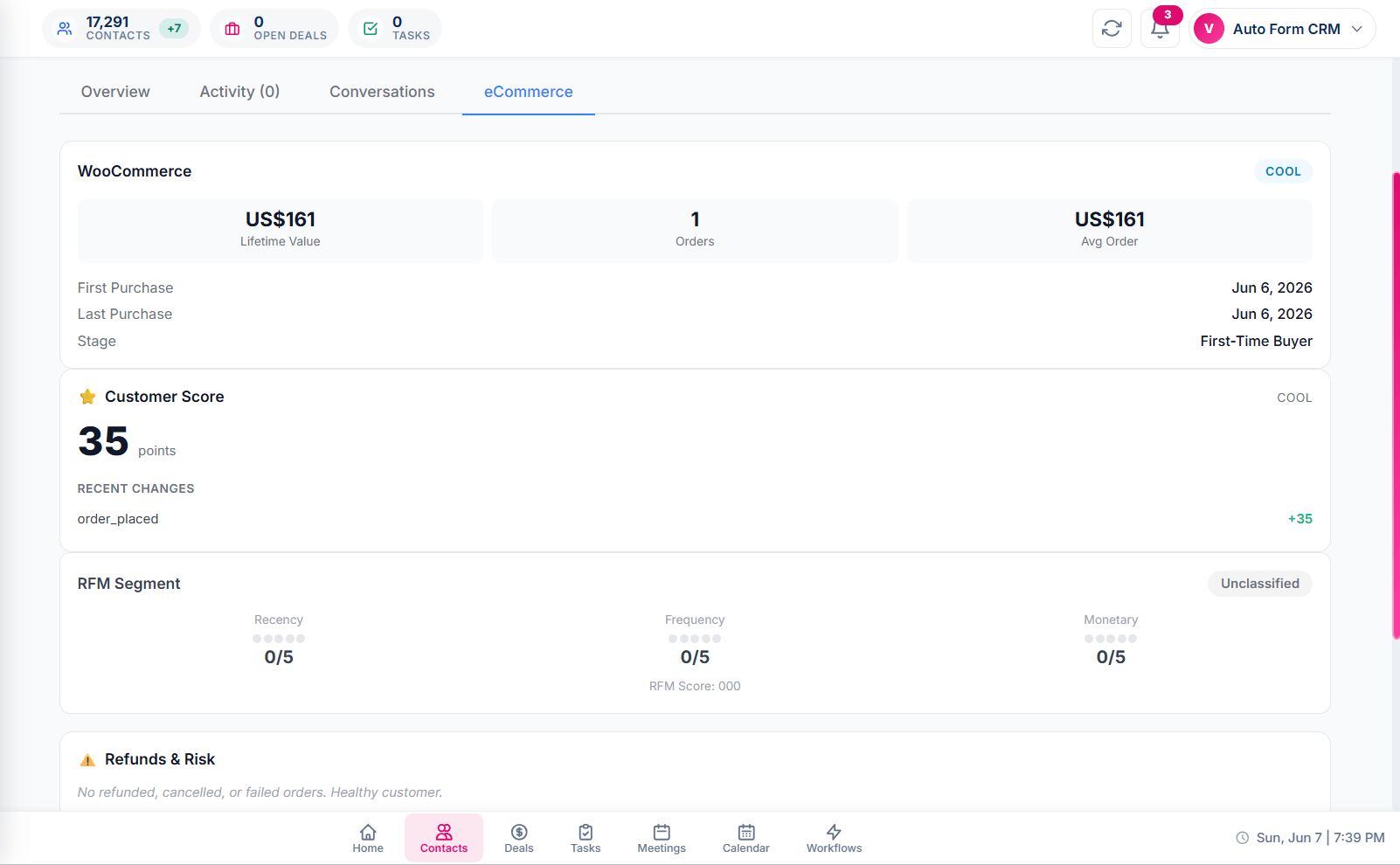
Customer Score
A configurable engine scores six behaviors — order count, total spend, repeat status, average order value, recency, and frequency. Each rule’s points and thresholds are editable. Tier transitions fire a workflow trigger: new Champion? Send the gratitude sequence. Slipping to Cool? Trigger the win-back flow.
RFM Segmentation
Eleven behavioral segments, assigned automatically from each customer’s Recency, Frequency, and Monetary scores (1–5). Run the calculation across your full customer base from one screen, view segment cards with counts and percentages, and filter contacts by segment to build hyper-targeted campaigns.
Smart product recommendations
Rule-based, not AI guesses. The system analyzes which products are most often bought alongside what each customer already purchased (co-purchase weighting), plus popular products in categories they favor. No order history yet? It falls back to your store-wide best sellers. Up to four per contact.
Refund & risk flagging
Customers with refunded, cancelled, or failed orders get flagged on their record. Spot patterns before they cost you margin.
Lifecycle stage tracking
Every customer is automatically classified by their stage — First-Time Buyer, Repeat Customer, Loyal Customer, and others — based on order behavior. Build workflows that respond to stage transitions.
Auto-tagging from purchases
Customers automatically tagged based on WooCommerce activity. “VIP Customer” after their third order. “Repeat Customer” after their second. Real-time, rule-based, configurable per store.
This is intelligence the rest of the WordPress CRM market doesn't ship. It's the depth that makes the difference between a contact database and a revenue engine.
Your Data, Your Rules, Your Exits
CSV import that thinks
Drop a CSV up to 5MB or 10,000 rows. Auto-mapping handles common column names. The preview shows you exactly what will import cleanly, what’s a duplicate, and which rows have errors — before anything writes to your database. Skip duplicates or update existing. Tags created on the fly.
Smart deduplication
Email is the match key. Existing contacts get updated (or skipped, your choice). No duplicate records get created. Period.
Full CSV export
Export your entire contact list, a filtered subset, or selected individual contacts. Take your data anywhere.
REST API with scoped tokens
Every contact operation is exposed at /wp-json/auto-form-crm/v1 — create, read, update, delete, search, bulk operate — with Bearer token authentication and scoped permissions. Limit tokens to read-only, write, or specific actions. Build integrations with Zapier, custom apps, or other plugins.
/wp-json/auto-form-crm/v1Outbound webhooks, signed and retry-safe
Subscribe to contact.created, contact.updated, and contact.deleted events. Every webhook fires as a signed POST with an HMAC-SHA256 signature, retries with exponential backoff on failure, and never requires you to poll for changes.
POST contact.createdPHP API for same-site plugins
Developers on the same install can call autoformcrm_create_contact, autoformcrm_update_contact, and friends directly — same validation, activity logging, and webhook pipeline as the REST API, without token overhead. Hooks like autoformcrm_contact_created let you react to contact events from your own code.
Honest Tools for Honest Communication
Block from Automations
One button stops all workflows, email campaigns, and automated sends for that contact — instantly, recorded with a timestamp and an optional reason. The contact stays in your database and the relationship stays intact, but they’re cleanly excluded from automated outreach. Manual one-on-one inbox replies still work; nothing automated hits their inbox again until you unblock them.
Email suppression tracking
Unsubscribe link clicks and hard bounces are tracked with their own timestamps, separate from the automation block. Re-subscribe is a deliberate action you (or the contact, via your resubscribe flow) trigger explicitly.
Activity-logged opt-outs
Every block and unblock writes to the contact’s activity timeline, attributed and timestamped. When an auditor or a customer asks “when did you stop sending to this person?” — the answer is right there.
Soft delete with optional purge
Deleted contacts are recoverable from a trash state. Set an automatic purge interval in settings for full removal after a defined number of days.
Built for Businesses Whose Customers Actually Matter
WordPress agencies
Manage CRM for every client account on their own install. Standardize how contacts are tracked across every client brand — for less than a single month of HubSpot. Build, deliver, and bill for client CRM as a service line.
WooCommerce store owners
Lifetime value, RFM segmentation, and behavioral product recommendations on every customer — out of the box, no add-ons. Reactivate “At Risk” buyers before they’re gone. Reward Champions with VIP sequences. Spot refund patterns before they hit your margin.
Freelancers and consultants
One CRM for your entire book of clients, running in the same WordPress install as your website. Track conversations, deals, and tasks without juggling tabs between Trello, Mailchimp, and a Google Sheet that’s already broken.
Service businesses
Roofers, plumbers, electricians, lawyers, consultants — anyone whose business runs on follow-up. Lead in, status updated, task assigned, sequence triggered, deal closed. Every step tracked on the contact record, every team member on the same page.
Course creators and coaches
Tag students by program. Build dynamic lists by enrollment status. Trigger nurture sequences based on completion stage. Sync purchases automatically through WooCommerce. Run your business and your community from one WordPress install.
Membership and community builders
LearnDash, MemberPress, BuddyBoss — anyone running a paid community in WordPress. Sync members automatically, segment by membership level, trigger renewal sequences, and see lifetime value on every member record. Your community CRM, not a separate tool.
How Auto Form CRM Stacks Up
| Auto Form CRM | HubSpot | FluentCRM | Spreadsheets | |
|---|---|---|---|---|
| Pricing model | Flat, from $149/yr | From $800/mo | Per-contact tiers | Free |
| Unlimited contacts | Tier-based | Unusable at scale | ||
| Every feature, every tier | — | |||
| Data on your server | ||||
| WooCommerce RFM + Customer Score | Limited | Add-on | ||
| Built-in deal pipeline | Add-on | |||
| Live chat + meeting scheduling | Paid tiers | Separate | ||
| Custom fields searchable instantly | Tier-gated | Partial |
Auto Form CRM vs HubSpot
HubSpot prices by contact, gates features behind tiers, and holds your data in their cloud. Marketing Hub Pro starts at $800 a month and grows past $1,500 at moderate scale. Auto Form CRM is $149 a year, flat, every feature included, your data in your own database. Same intelligence depth, a different planet of pricing.
Auto Form CRM vs FluentCRM
A respected WordPress CRM with a strong email foundation. Auto Form CRM differentiates with deeper WooCommerce intelligence (RFM, Customer Score, recommendations built in, not add-ons), a built-in deal pipeline, live chat, scheduling, and task management — all in core, at every tier.
Auto Form CRM vs Spreadsheets
A spreadsheet can hold contacts. It cannot search custom fields with a click, fire automated workflows, segment customers into RFM buckets, or sync with WooCommerce. Spreadsheets are where contact data goes to die. Auto Form CRM is where it goes to drive revenue.
Auto Form CRM vs cloud SaaS in general
SaaS CRMs rent you software — stop paying and you lose access, and your relationships become a hostage situation. Auto Form CRM gives you a one-time-per-year license and stores data on your server. Cancel anytime. Your contacts stay where they always were.
The Questions Buyers Actually Ask
They stay exactly where they are — in your WordPress database, on your server. Auto Form CRM is a self-hosted plugin. Your data was never in our cloud to begin with, so cancelling doesn't take anything away from you.
Yes. No soft caps, no tier-based contact limits, no surprise upgrade prompts. Your only constraint is your own hosting capacity, which for most WordPress installs is far beyond what any small or mid-sized business needs.
No. The CRM runs in its own database tables and admin interface, separate from your public site. Real production installs run with tens of thousands of contacts on standard WordPress hosting without performance impact on the frontend.
Yes. Export your contacts from any tool as CSV, then drop them into the Auto Form CRM import wizard. Auto-mapping handles common column names, and deduplication keeps your data clean if you re-import or merge sources.
No. Install like any other WordPress plugin. The setup wizard walks through configuration, and the contact management features work out of the box. A developer is only useful if you want to build custom integrations via the API.
Auto Form CRM includes a built-in deal pipeline, live chat, meeting scheduling, task management, and deeper WooCommerce intelligence (RFM segmentation, Customer Score, behavioral recommendations) in the core product, with every feature at every pricing tier. FluentCRM is strong in email marketing maturity but treats those other capabilities as separate plugins or higher tiers.
Yes. The eCommerce integration is native, not a bridge plugin. WooCommerce orders sync to contact records automatically, and every customer carries lifetime value, order history, RFM segmentation, Customer Score, and behavioral recommendations on their record from day one.
The Agency tier covers 50 sites under one license at $499 a year. Each client install is independent — their contacts, their data, their dashboard. You manage CRM as a service across your full client base from one license.
Yes. The CRM ships with two built-in roles (Admin with full access, Team Member with everyday access) and supports custom roles with granular page-level permissions. Every contact has an Owner field, and lists can be shared with the team or kept private.
Auto Form CRM stores your data on your server, under your control, which is the foundational requirement for GDPR data residency. Built-in tools include Block from Automations with timestamped logging, email suppression tracking, soft delete with auto-purge, and consent checkboxes on capture surfaces like forms and chat. We track suppression and opt-out events with timestamps. Full compliance is your responsibility as the data controller — we give you the tools to deliver it.
Contact Management Is the Foundation. Here's What Builds on It.
Every other Auto Form CRM feature is anchored to the contact record. Once contacts are in place, the rest of the platform comes alive.
Deal Pipeline
Move contacts through your sales process with a drag-and-drop Kanban board.
Learn more→Workflow Automation
Build visual automations triggered by contact events, status changes, or custom field updates.
Learn more→Email Campaigns
Send segmented campaigns to lists, tags, or filter rules drawn from your contact database.
Learn more→Live Chat
Capture website conversations and attach them to the contact record automatically.
Learn more→Tags
Organize contacts into color-coded labels for fast filtering and workflow targeting.
Learn more→Custom Lists
Build static or self-updating dynamic lists from any contact criteria.
Learn more→Custom Fields
Extend the contact record with any data your business needs to capture.
Learn more→WooCommerce CRM
Sync WooCommerce orders, customer scores, and RFM segments into the contact record.
Learn more→Integrations
Connect Google Calendar, Zoom, Microsoft, Mailgun, Twilio, and more.
Learn more→Your WordPress CRM Should Work as Hard as You Do
Auto Form CRM gives you the contact management depth of a $1,500-a-month SaaS platform, the data ownership of a self-hosted plugin, and the price point of a one-time-per-year license. Every feature included at every tier. Unlimited contacts at every tier. Your server, your data, your rules.
Install in minutes. Cancel anytime — though your contacts will stay either way, because they're yours.
Read the DocsBuilt by Amora Digital (KVK 99536811) in the Netherlands. Made for WordPress. Trusted on real production installs managing tens of thousands of customer records.